

Physiotherapy clinics in Lebanon
Physiotherapy clinic software for practices in Lebanon
Physiotherapy practice management for small teams: coordinate practitioners and rooms, keep patient notes close to the schedule, track payments, and share clinician-authored home exercise programs.
Clinora in practice
Follow the clinic day from schedule to patient follow-up
Plan the day by practitioner or treatment room, then move into the patient file for notes, treatment history, payments, and exercise programs—without adding hospital-scale complexity.
Real Clinora screens
See the calendar and exercise builder in practice
These screens use synthetic demo data. They show the same scheduling and physiotherapy-program workflows clinic staff use inside Clinora.
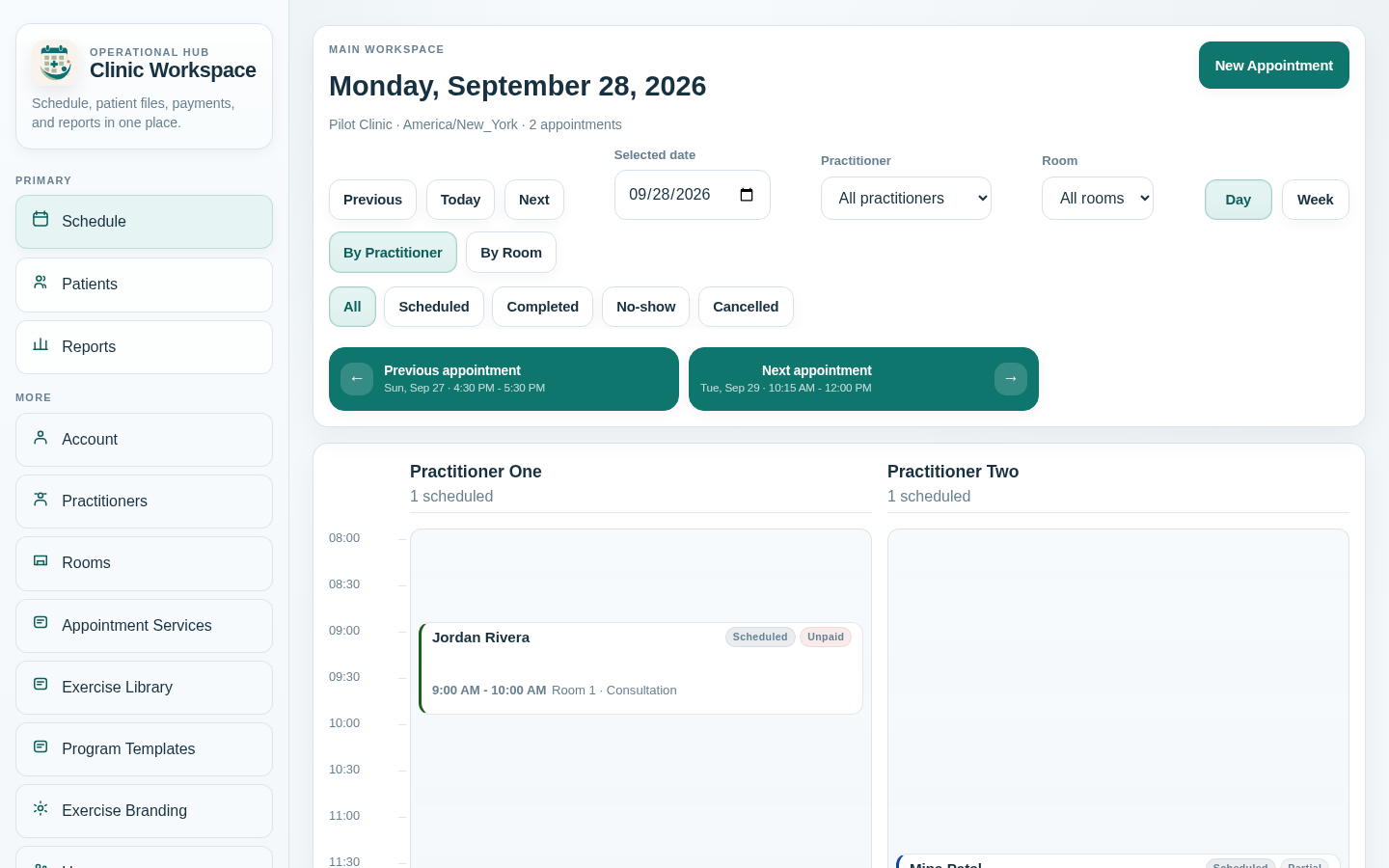
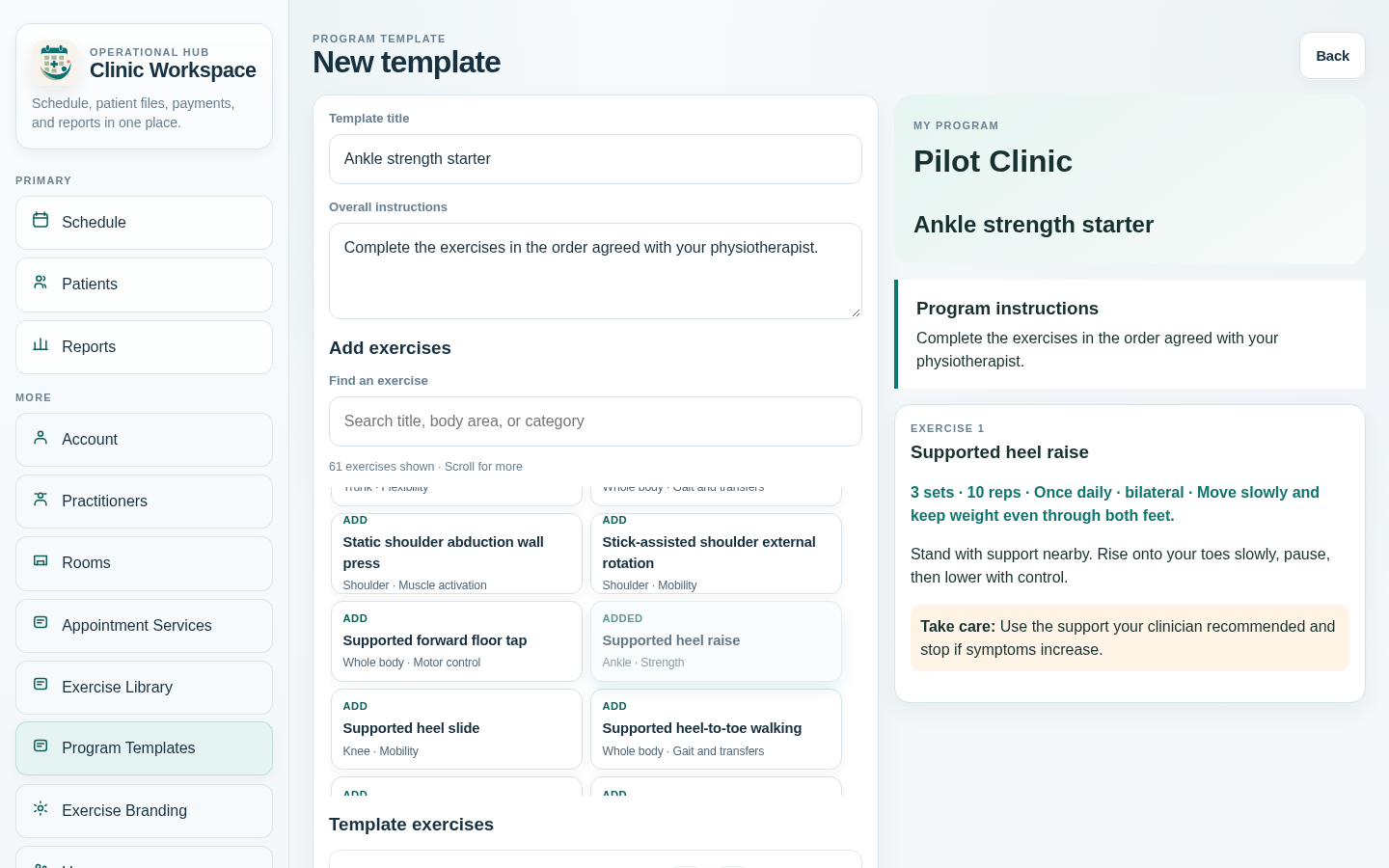
The clinic day
From the morning list to the final payment
A direct path through the tasks small physiotherapy teams repeat every day.
- 01
Set up the session
Define session names, duration, pricing, practitioner load, and room load around the way your clinic works.
- 02
Run the schedule
Clinic staff book, reschedule, complete, cancel, or mark a no-show while capacity checks help avoid overloaded rooms and practitioners.
- 03
Continue from the patient file
Open searchable patient files, add appointment-linked or standalone notes, review treatment history and files, and prepare a patient-specific exercise program when needed.
- 04
Close the operational loop
Record payments and patient credit, track clinic expenses separately, and review appointment and payment reports with current-view PDF or XLSX exports.
Product depth
Daily tools for a small physiotherapy practice
Keep clinic management simple while giving physiotherapists a focused way to carry treatment context beyond the appointment.
Patient files and treatment continuity
Keep patient details, appointment-linked or standalone notes, treatment history, attachments, and imaging records in an access-controlled workspace.
Practitioners and treatment rooms
Assign one practitioner and one room to each appointment, with capacity-aware checks for busy schedules.
Home exercise programs
Create clinic exercises and reusable templates, tailor dosage and instructions for a patient, publish a versioned plan, and share a revocable browser link that can be printed or saved as PDF.
Consent-based WhatsApp reminders
After clinic setup and sender approval, opted-in patients can receive appointment reminders in English or Arabic. Messages omit treatment, diagnosis, notes, and payment details.
Operational payments and expenses
Record money received, allocations, unused patient credit, balances due, and clinic operating costs without presenting Clinora as accounting software.
Operational reports
Review appointment status, practitioner activity, patient balances, payments, and allocations across useful date ranges, with current-view PDF and XLSX exports.
Questions from clinic owners
Straight answers before you choose
Is Clinora suitable for a small physiotherapy clinic?
Yes. Clinora is designed around small-clinic scheduling, patient files, notes, operational payments, expenses, and reports. It is especially suited to teams that want the calendar to remain the center of the workday.
Can I use the physiotherapy clinic app on my phone?
Yes. Use Clinora in your phone’s web browser to check the schedule, find a patient, and work with appointments and notes. Desktop layouts remain available for broader operational work.
Can I manage several practitioners and treatment rooms?
Yes. Clinics can configure practitioners, rooms, session types, and capacity rules, then assign a practitioner and room to each appointment.
Can I create home exercise programs for patients?
Yes. Physiotherapists can create clinic exercises and reusable templates, adjust dosage and instructions for a patient, and publish a versioned program through a revocable no-account browser link. The same patient view can be printed or saved as PDF. Clinicians remain responsible for exercise suitability and progression.
Can Clinora send appointment reminders?
Optional WhatsApp appointment reminders may be available after clinic setup, patient opt-in, and sender approval. The patient’s reminder language can be English or Arabic, and reminder messages exclude treatment, diagnosis, notes, and payment details. Ask Clinora about eligibility and setup requirements.
Can I track patient payments?
Yes. Clinora records operational payments, allocations, outstanding appointment balances, and unused patient credit. These records support clinic operations rather than full accounting.
Does Clinora replace accounting software?
No. Clinora keeps day-to-day payment and expense records visible to the clinic, but it is not a general ledger, tax, payroll, or insurance system.
Clinic guides
Practical next steps for the team
Detailed operational guides that stay useful whether or not you choose Clinora.
Schedule practitioners and rooms without losing the day
Use a worked example to check duration, practitioner load, room load, and same-day moves together.
Build a complete appointment-reminder workflow
Connect contact details, consent, clear change requests, delivery follow-up, and accurate appointment outcomes.
A practical next step
See how Clinora fits your physiotherapy clinic day
Tell us how your team schedules sessions, rooms, notes, and payment follow-up.